For those of you who are living in uncertainty, let me rest you by saying that HTML is alive and kicking!
The future of HTML is bright, whose trends we will discuss later on. As technology continues to advance at a rapid pace, staying up-to-date with these trends will be essential for any developer looking to create modern and user-friendly websites.

Why does HTML matter?
As you already know, HTML is the structure of all things web. It has been around almost the same time as the WWW and is used by more than 90% of all websites. Its capability to run in just about any kind of setting is the main reason it stays influential in the mobility world. It is also very easy to integrate HTML with other programming languages.
The evolution of HTML has enabled richer web interfaces and experiences. Each day, it is more powerful to keep up with the technology and a wide range of devices, and also to support increasingly complex elements in native ways, without the need for plugins.
Integration with augmented reality (AR) and virtual reality (VR), responsive and scalable interfaces, accessibility, and inclusion are all part of the present and future of HTML.
And it is expected, HTML, now 5.0, will continue to advance in the next years, because HTML 6.0 is on its way. So we really can´t wait to know what it might bring!
As said before, it is likely to include:
- Enhanced native support to web components, reducing framework dependency;
- Better integration with AI (artificial intelligence) and ML (machine learning). For example, facilitating embedding of AI-enabling features like voice recognition, real-time translation, etc;
- New media formats, like 3D;
- Better semantics, with more refined tags to better describe content;
- Improved security and privacy.
While it is not here yet (it may take some years…), developers can take advantage of HTML5’s new features and emerging features like polyfills (a piece of code used to provide modern functionality on older browsers that do not natively support it) or browser flags: advanced settings within web browsers that allow users to enable or disable specific functionalities that are still in development or testing.
Tips and Trends
As HTML continues to evolve, modern developers should be aware of several new trends and best practices. Here’s some of the new trends and tips that can help you stay ahead in HTML development in 2025:
Accessibility
Trend: Web accessibility is gaining more focus, and HTML5 has introduced many features to improve it. Developers are increasingly using HTML elements that make websites easier to navigate for people with disabilities who use screen readers or other assistive technology.
Tip: Use semantic HTML elements like <header>, <footer>, <article>, <section>, and <nav> to provide a clear and descriptive structure. Also, make sure to use alt text for images, form labels and ARIA attributes, and <button> tags properly for enhanced accessibility.
A brief note on ARIA attributes, as they are very important:
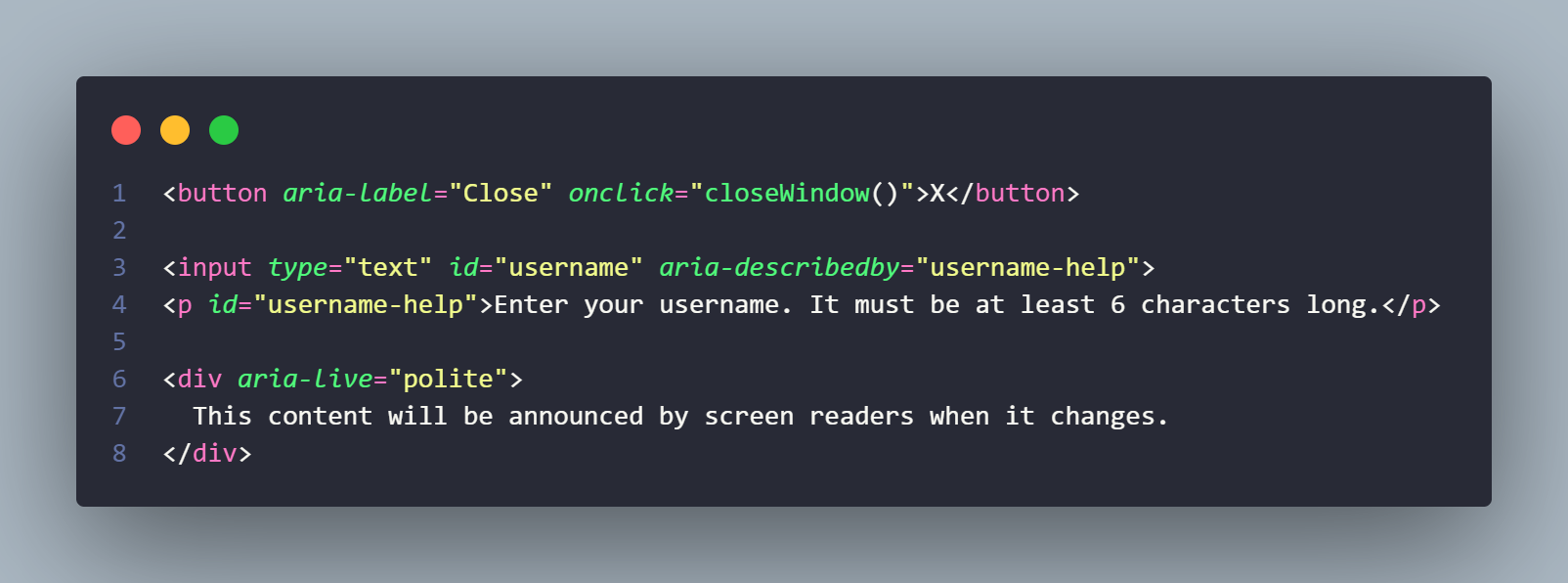
ARIA (Accessible Rich Internet Applications) attributes are a powerful way to enhance web accessibility, especially for dynamic and interactive content. These are some examples:
- aria-label: used to provide a label for an element when the visible text does not adequately describe the element.
- aria-labelledby: used to reference another element that provides the label for the element.
- aria-describedby: used to provide additional descriptive information about an element.
- aria-hidden: used to indicate whether an element should be exposed to accessibility APIs.
- aria-live: used to define the priority with which updates to dynamic content are announced to users by assistive technologies, such as screen readers. Examples: chat windows, live notifications, or status updates.
- Polite: this means that the screen reader will wait for the user to finish listening to the current content before announcing the new updates. This is appropriate for less urgent content, such as notifications that don’t require immediate attention.
- Assertive: updates are immediately announced, interrupting the current speech output. This is used for urgent or high-priority content that needs immediate attention, such as an error message or an incoming chat message.
- aria-checked: used to indicate the state of a checkbox or other interactive element.
- aria-expanded: indicates the expanded or collapsed state of a collapsible element, like an accordion or dropdown.
- aria-required: indicates that an input field is required for form submission.
- aria-disabled: indicates that an element is disabled.
- aria-controls: indicates that the element controls another element, like a button controlling a dropdown menu.
- aria-role: defines the role of an element (though in HTML5, many roles are inferred, for example,
<header>has the role “header”).
Semantic and SEO
Semantic HTML means using HTML elements according to their intended purpose. In addition to improving SEO, semantic markup also benefits users with disabilities who rely on assistive technologies like screen readers. By structuring content with semantic tags, developers can ensure a more inclusive web experience for all users.
Trend: Search engine optimization (SEO) continues to evolve, and semantic HTML is crucial for ensuring better rankings on search engines.
Tip: Use the correct semantic HTML elements to structure your content for SEO. Elements like <article>, <section> (for grouping related content), <header>, <footer>, and <main> (to wrap the central content of the page) help search engines understand your content better, rather than generic <div> and <span> tags.
These are some less known examples of tags:
details and summary
The <details> element is used to create a disclosure widget from which the user can view or hide additional information. The <summary> element acts as the trigger for expanding or collapsing the details. It’s an easy-to-implement, native way to create accordions or toggleable content.
progress and meter
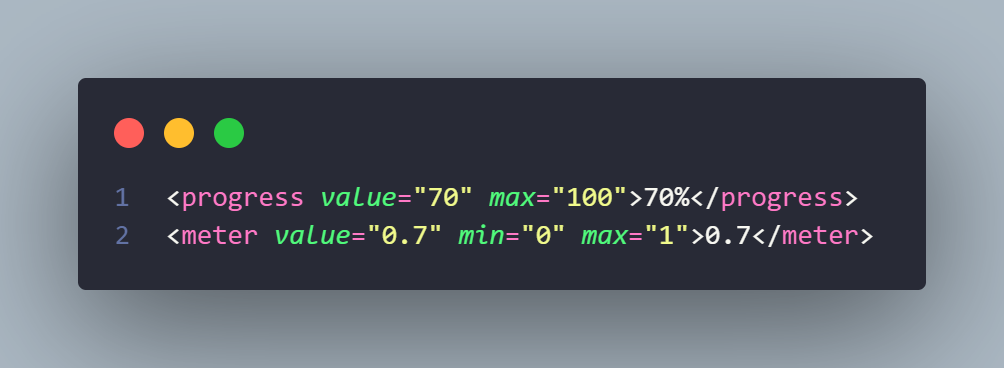
The <progress> and <meter> elements are used to represent the progress of a task and a scalar measurement within a known range, respectively. These elements offer a more semantic way to represent progress bars and measurements compared to using <div> and styles.
output
The <output> element is used to represent the result of a calculation or user action. It provides a semantic and structured way to display results, making the output of forms or scripts more accessible and easier to understand.

canvas
The <canvas> element provides a drawing space that allows developers to create dynamic graphics and animations using Javascript. This feature is particularly useful for game development and interactive visualizations.
Responsive Design with picture and source elements
The <picture> element allows you to define multiple sources for an image, letting the browser choose the most appropriate one based on device characteristics (e.g., screen size, resolution), improving performance, especially on mobile.
Trend: The use of the <picture> element for responsive images is becoming more important for improving page load times on different devices.
Tip: Use the <picture> element with the “srcset” and media attributes to serve different image sizes based on viewport width, resolution, or other device characteristics.
.png)
dialog for Modals
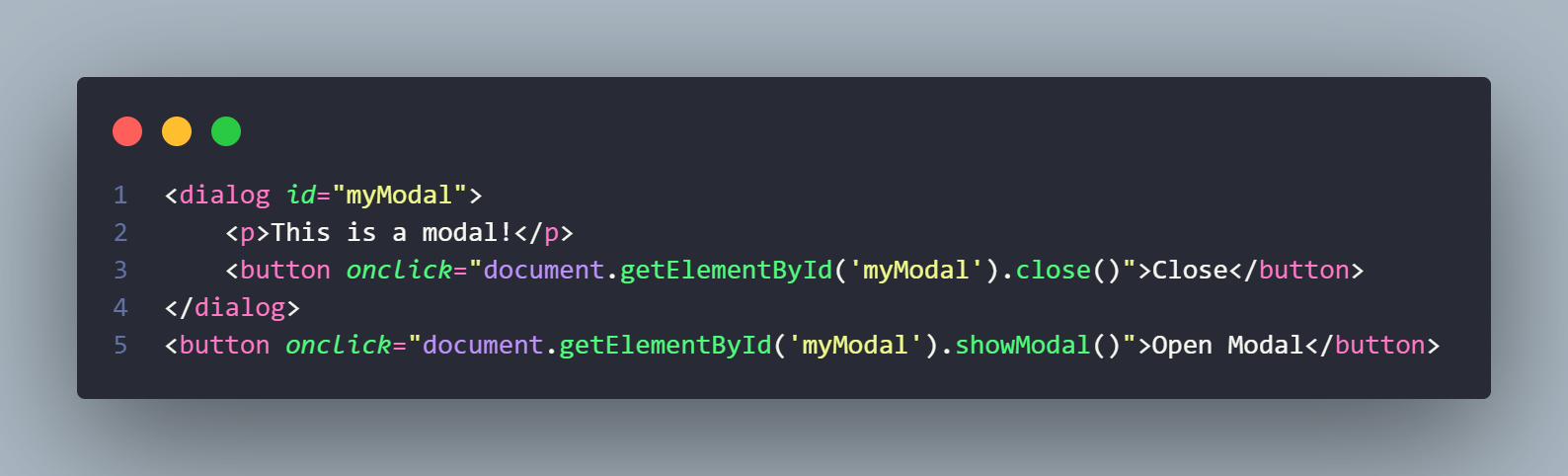
Trend: The <dialog> element provides a native way to create modal dialogs or popups, without relying on external libraries or Javascript to manage the display and behavior of the modal.
Tip: Use <dialog> for modals to create a more semantic, accessible way to show dialog boxes and alerts.
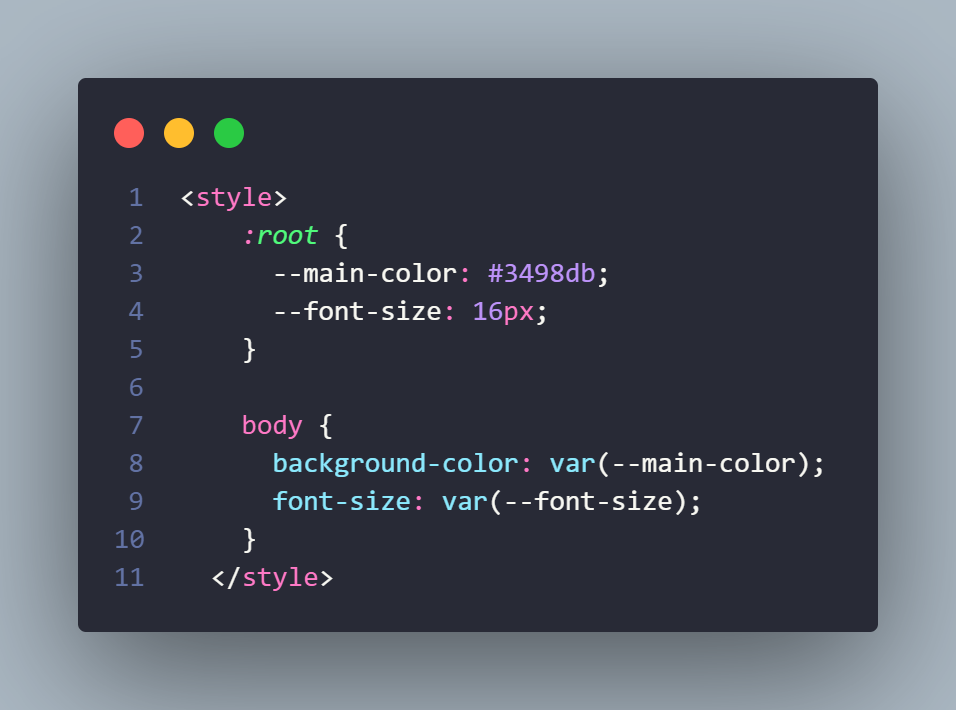
CSS Variables
Trend: CSS variables are becoming more common to make stylesheets more dynamic and reusable.
Tip: Use CSS variables for theme customization, making it easier to update colors, font sizes, and layout values across your site.
Other HTML Attributes
Data (data-*)
The data-* attribute allows you to store custom data in HTML elements. This is particularly useful when you need to attach additional information to an element that isn’t visible to the user but can be accessed with JavaScript.
ContentEditable
This attribute indicates if the element should be editable by the user. If so, the browser modifies its widget to allow editing.

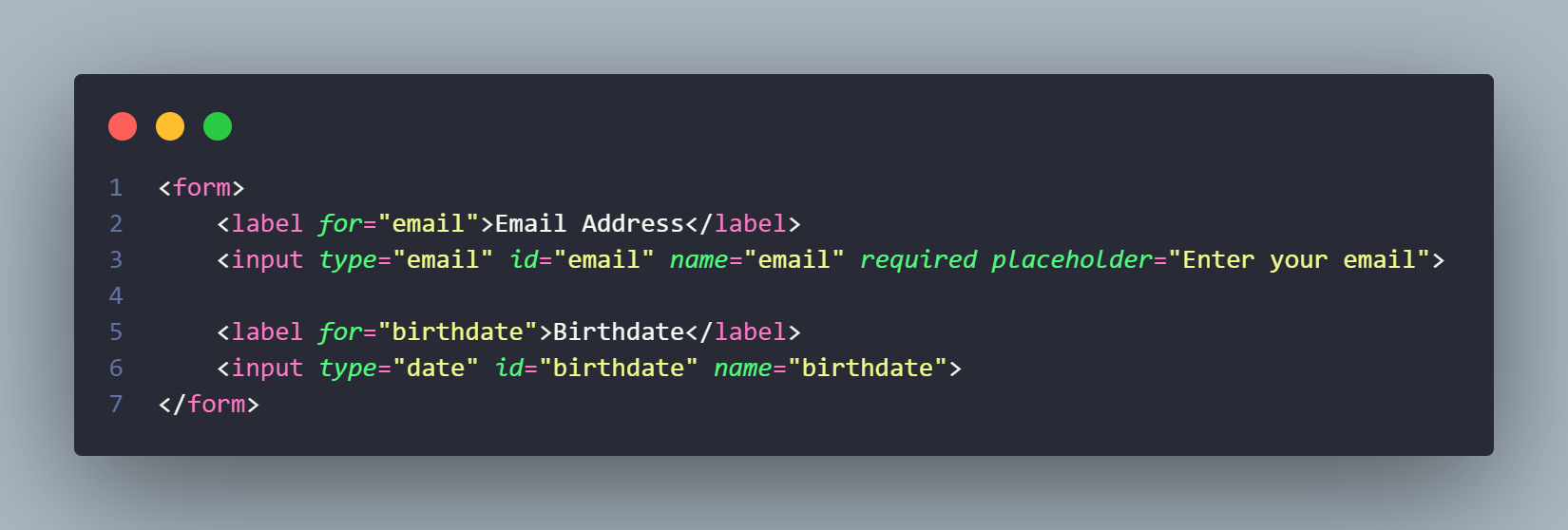
The Evolution of Forms
Trend: HTML forms are becoming more powerful with features like form validation, custom validation messages, native input types like date, email, tel, color, and range, and attributes (required, placeholder, autofocus, min, max) to improve user interaction. In the future, form enhancements will likely continue to evolve, adding features such as better native file uploads, multistep forms, etc.
Tip: Use the new input types to enhance form validation and reduce the need for JavaScript. The autocomplete attribute can also improve form usability.
Enhanced Support for Internationalization
Trend: HTML now includes better support for internationalization, allowing developers to create multilingual websites with ease.
Tip: Use the lang attribute and support bidirectional text (dir="rtl") for languages that require it. Leverage the <meta charset="UTF-8"> tag for universal character support.
Custom Components
Trend: HTML is increasingly used in conjunction with Web Components, which allow developers to create reusable, encapsulated components that can be used across various projects.
Tip: Use the <template> and <slot> elements along with custom elements to create reusable, encapsulated components that work across different projects and frameworks. The <template> tag allows you to declare HTML content that is not rendered when the page loads, but can be activated later with Javascript.
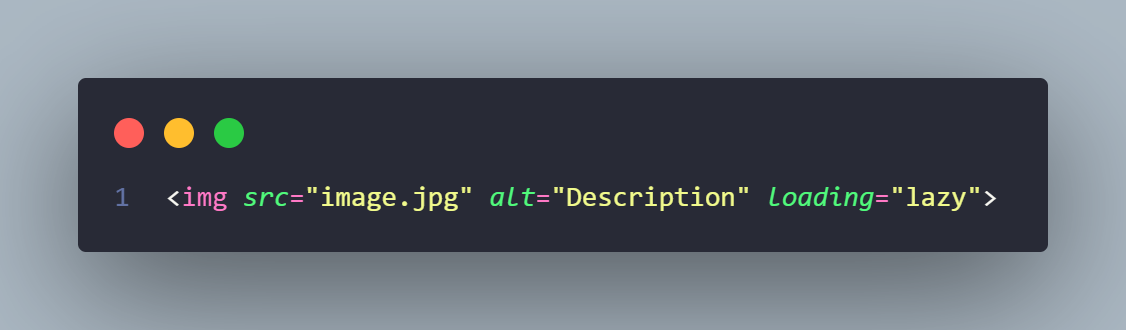
Focus on Performance: Native Lazy Loading
Trend: Lazy loading is becoming a standard for optimizing web performance, and browsers now support native lazy loading for images and iframes.
Tip: Implement loading="lazy" on images and iframes to defer loading of offscreen content until the user scrolls near it.
HTML APIs for More Interactive Experiences
- HTML is becoming more integrated with APIs that enhance user interaction and functionality, like the localStorage and sessionStorage APIs, Web Speech API, Geolocation API, Drag and Drop API, and Web Bluetooth API.
- These APIs allow developers to create more dynamic and immersive web experiences directly within the browser, without requiring external plugins.
It is safe to say that HTML5 has simplified adding discussion boards, drag-and-drop tools, wikis, chat platforms, for example.
Progressive Web Apps (PWAs) and HTML
- Trend: HTML is at the core of PWAs, which allow websites to function as apps on mobile devices. PWAs provide offline capabilities, push notifications, and improved performance similar to native mobile apps. This makes them accessible to a wider audience.
- Tip: Leverage HTML to create manifest files, service workers, and responsive designs to make your site work like a native app.

HTML and Artificial Intelligence, hand in hand
There is a huge potential on how both technologies will continue to integrate with each other, leading to smarter, more dynamic, and highly personalized web experiences. How?
Web Development powered by AI: automatically adjusting content, images, and layouts for different devices and environments. The process can become simpler and intelligent, requiring less HTML code for responsive design and content.
Personalized Web Experiences: delivering real-time, customized content based on user preferences, behavior, and interactions.
Voice Interaction: providing more intuitive ways for users to engage with voice-activated, text-based, and image-driven interactions.
Improved Accessibility: suggesting real-time improvements for better screen reader compatibility, language translation, and accessibility features, making the web more inclusive.
SEO and Content Creation: optimizing HTML content for SEO and helping generate content in real-time, improving search rankings.
Security: detecting threats and protecting user data through smarter monitoring.
Frameworks: allowing developers to easily integrate advanced AI features like predictive text and sentiment analysis without deep technical expertise.
Ethical Considerations: developing regulations because transparency, data privacy, and user manipulation require more attention.
The future of HTML is not just about creating richer content, but also about making the web more accessible, and with more performance, modularity and interactivity.
Thank you!
PS: Don’t forget to always use <!– Comments –> in your code!…