
The goal of this article is to guide you in the first steps of creating your first application using REACT. It’s not in scope to dig deeper into every aspect of the architecture, files, and code. If you want to learn more, please refer to the official REACT website.
In the end, I hope you can understand the basic fundamentals of how to start a project and have some knowledge to help guide you in further steps and more complex tasks.
What is React
In a very short and concise definition, React is a JavaScript library to help you develop web interfaces.
Created in 2012 by a Facebook worker, it took 1 year to go open source and right after it was appended, it experienced rapid adoption by the development community.
In 2015, the world got to know React Native, a framework to build mobile cross-platform applications by using React.
Today, the React community is one of the largest ones but not all is sunny and blue skies since there started to appear some really good alternatives like Angular (from Google) or Vue.js.
Starting a new project
Step 1. Requirements
To start a project in React and set up the environment, you need to install Node.js on your system. Since this is not the scoop of this article I advise you to download the latest version from the official Node.js website (https://nodejs.org) and install it following the appropriate instructions for your operating system.
As a plus, I strongly recommend the usage of Visual Studio Code IDE (an amazing code editor with hundreds of extensions to assist you while coding).
Step 2. Create a new project
To start a new project you just need to follow a couple of steps:
- Choose a folder on your local machine to store your project and open VSCode on that folder;
- Open a new terminal (ctrl+shift+ç) and type:
> npx create-react-app react-project
This command will generate all the files and folder structure you need to start your project inside a folder called “react-project”.

Step 3. Run your project
To test if your application was well generated, you just need to go to your new project root directory and run the following command in the terminal:
> npm start
If all goes ok, the terminal should open your application in a new TAB in the browser.

Step 4. Bundle your application into production
If you want to deploy your project to a server on the internet, as a starting point you just need to run the following command in the root directory of your project:
> npm run build
This will generate a new folder called “/build” where the compiled version (static files) will be stored.
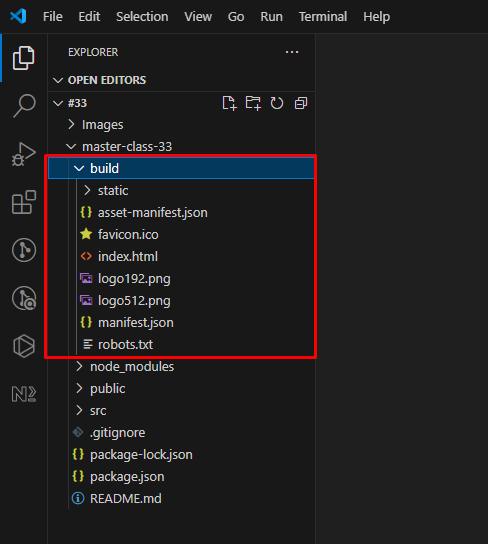
The content of this folder is what you need to send/copy to your server for you to be able to see the application you just created on the internet and not just on your local machine.
Basic structure guidelines
Folders:
- “/src”: this is the source root of your entire project. You can add more files and folders here to help you organize the architecture of your application;
- “/public”: in this folder, you can store assets like images that you need to use in your application;
Files:
- “src/index.js”: this file is the entry point of your entire React app. It imports the root component and renders it to the DOM. It’s the first page the browser will read;
- “src/App.js”: this file contains the root component of your application. It’s the right place for you to start building your interface by placing your HTML and components like the layout;
- “package.json”: this file contains all the information about your application like its version, name, and all the libraries that it needs (for example SASS);
Improving your project
The normal and logical following step is to start thinking “How can I improve my project?”.
An easy way to start improving your projects is by using SASS which is a CSS preprocessor that adds more capabilities to CSS such as Nesting, functions, inheritance of code, operators, and other features.
Adding a SASS compiler
To use SASS in your project, you need to install it. For that, you need to go to your project source folder and run the following code in the terminal (depending on the package manager of your preference):
> npm install sass
or
> yarn add sass
From this point on, you can rename all your “.css” files into “.scss” because they will be compiled when you save them.
After this, you just need to go to your project root directory “src/App.js” file and import the “.scss” that you need for your project.
There are hundreds of other packages that you can install and use to help you develop your interface. Personally, I use the NPM package manager.
UI Frameworks
Now that you know how to start creating apps, you will probably start questioning if you need to create CSS and components every time you need a new app.
The answer is easy, no you don’t need to create the same components and styles for every app you will create. There is something called “UI Frameworks”
Material UI
One of the most used UI frameworks for React, it’s based on Google’s Material Design and maybe because of that, people started to adopt it. Has tons of components and styles for web and mobile.
One of the biggest advantages is that Material UI has a “styles” version that in some scenarios could be better. Just be aware that by the time I am writing this article, this base-style version is still under development.
Bootstrap
Based on the highly popular CSS Bootstrap framework, this UI react framework, like Material UI, also delivers many components and styles ready to use. I believe Material UI probably has more components than Bootstrap.
Semantic UI
Semantic is yet another alternative to help you create a good UI for your apps.
Has more than 50 components and utilities. It uses a simpler design (sometimes I feel that Material UI could have an overload of styles I don’t need) allied to a powerful API.
What’s next?
This guide focuses on starting developing and deploying your first application using React but there is much more than that.
I would say it is logical to learn more about APIs (to read and write dynamic data), architecture, TypeScript, tests (automated), and performance.
Conclusions
I consider React easier to learn compared to other libraries like Angular but since it’s so customizable and there are a lot of different ways of doing the same thing, it sometimes could hurt when trying to figure out how to solve an issue or perform a specific task.
There are no naming conventions, no architecture conventions, nothing. It’s all done your way.
My advice is for you to learn the basics from React and then do the same for Angular, Vue.js, or any other library and proceed with deep learning with the one you prefer the most.
In the end, the most important thing is for you to enjoy developing applications and feel good and happy while doing so.