Imagine you were asked to perform some tasks in a project with more than 300 files. Say you had to search for all the words that matched some prerequisite. This could take you a lot of time and effort if it weren’t for the notorious “Regex” (or Regular Expressions).

Yes, they can be intimidating, something that only computer engineers from NASA could master. The syntax is scary at first, and even experienced developers still find themselves searching the internet or Chat GPT to check the correct way to write them.
But fear not. If you start learning and understanding the basic concepts, it can become a powerful tool for you. So, the purpose of this article is to briefly introduce Regex, so that any beginner won’t sweat when it comes to handling it.
Let’s start delving into Regexland!
1. What the heck is Regex?
Regular expressions, or Regex, is a widely used technique developed in computer science and consists of a combination of characters, special symbols, and metacharacters, which specify search patterns within text.
It has many applications such as, for example, extracting data from strings, searching for a certain set of characters in a web page or an HTML tag with certain class names, or even validating user input (email addresses, phone numbers, and passwords), to name a few use cases.The concept of regular expressions traces back to the 1950s, when American mathematician Stephen Cole Kleene (1909 – 1994) introduced them as a notation for defining patterns in formal languages. Kleene’s work also formed the foundation for theoretical computer science. Cool, isn’t it?
Regex is a cross-disciplinary tool, with built-in support in various programming languages, but with slightly different syntax in each one. Therefore, you’ll need to make minor changes and adapt your code accordingly. A regular expression written in PHP may differ from one in JavaScript, so a Regex that works correctly for your problem in one programming language may not work correctly in another.
2. Do I really, really, really need to use Regex?
With regular strings, we can perform operations such as concatenation, length calculation, and slicing, but with regular expressions, we can go further and perform more complex chores. That’s why it is so important and helpful for developers. Hey, but don’t get over-excited: too large Regex strings make it impossible to read and maintain code.
As said before, the way we write regular expressions may be different among programming languages. This article will focus on how to write and apply Regex in Javascript, so having a basic understanding of it will be beneficial.
Javascript has always had support for regular expressions. But by 1999, with the release of ECMAScript, the RegExp() constructor was introduced. This gave Javascript developers the ability to start using regular expressions directly in their code, in the Javascript way.
Summarising, you can create regular expressions in two ways, both resulting in the same output:
1. Regex Literal

2. Constructor Function

Also, the many methods of the RegExp and String objects in Javascript are available to use with regular expressions, with either syntax below, depending on the method*:
regex.method(string)(test(), exec() methods, for example)
or
string.method(regex)
(match(), replace() methods, for example)
*Javascript methods are not within the scope of this article. For further reading, visit the MDN Web Docs: https://developer.mozilla.org/
3. Regex Guide – on the way to victory!
To better understand and start writing Regex, there are important concepts we need to grasp. Here’s a summary guide of the most relevant topics, from basic to more advanced, and with practical examples, to help you along your journey.
3.1 Anchors
Anchors are special characters that represent positions within a string.

By default, Anchors work in single-line mode, meaning they match the beginning and end of the entire string. If you want to match the beginning and end of individual lines within a multiline string, use the “m” flag, like this:
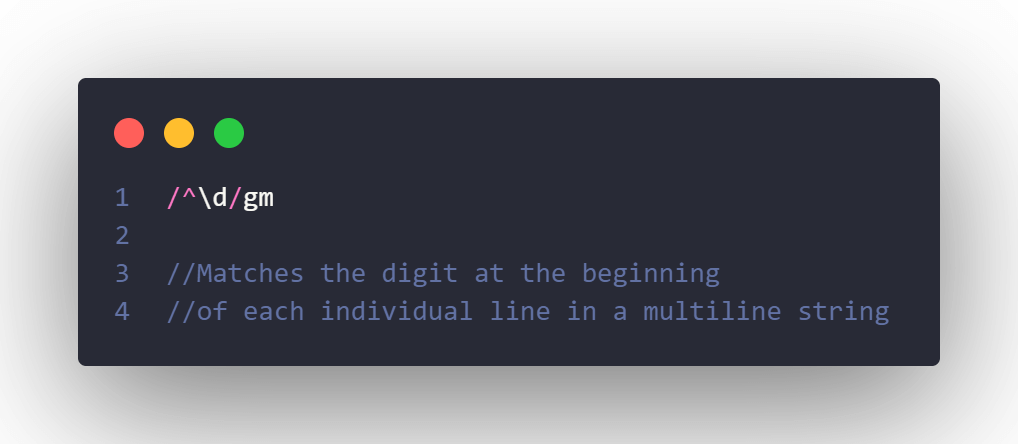
Examples:

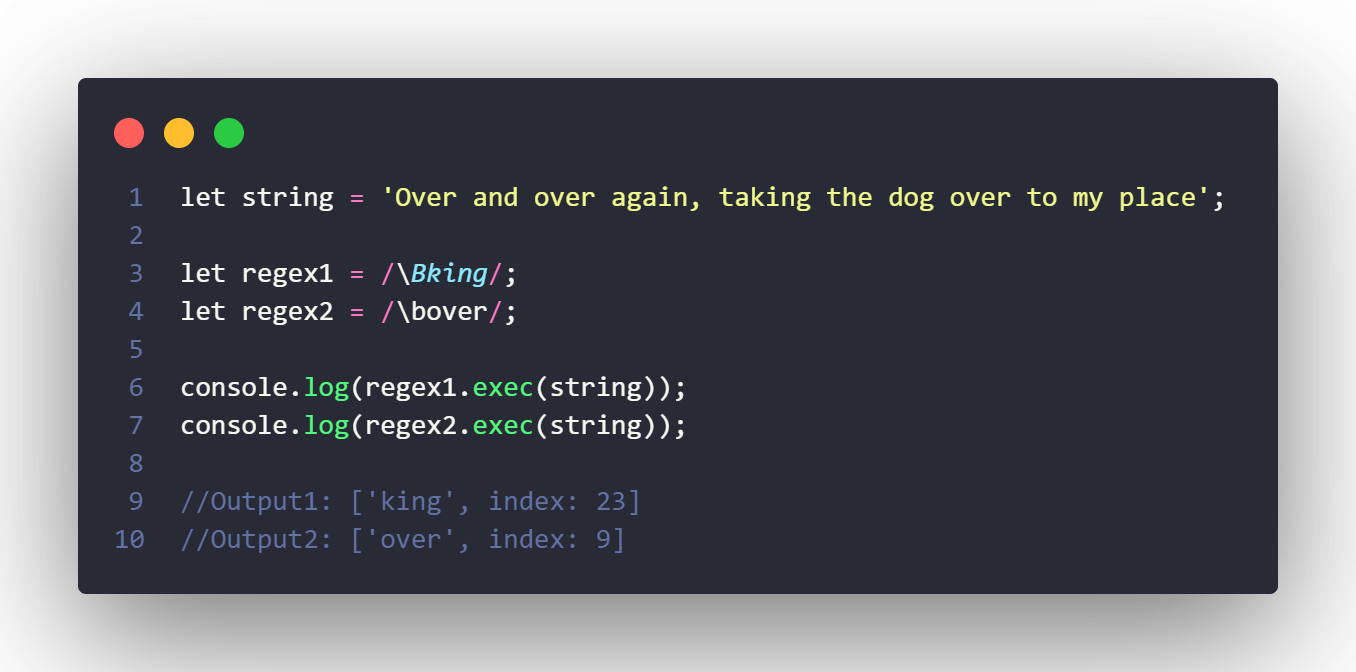
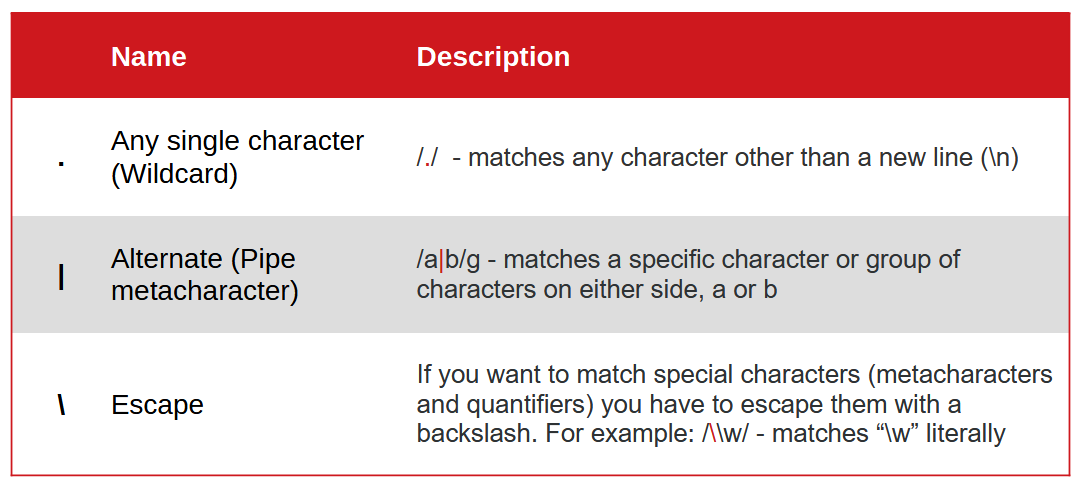
Other basic characters:
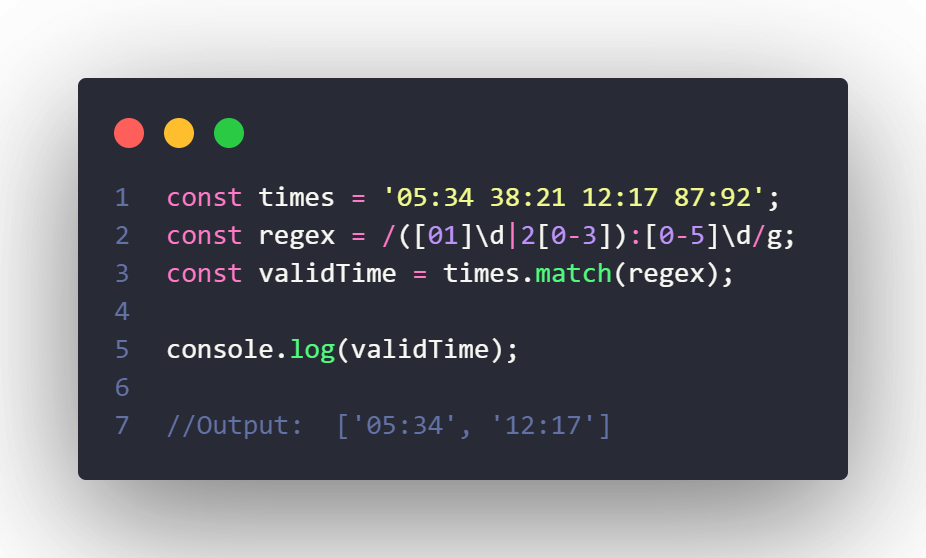
Imagine we want to retrieve only valid time strings in the format hh:mm. Regex Alternation (|) is ideal for this:
3.2 Quantifiers
Specify how many times a certain preceding character or group of characters should appear in a string.


By default, quantifiers operate in “greedy” mode, as they try to match as many characters as possible. The “lazy” mode, on the other hand, returns as few characters as possible to match the pattern, just by adding a question mark (?) after the “greedy” quantifier. Here’s an example:

3.3 Flags
Flags are optional parameters that modify the behaviour of the pattern matching.
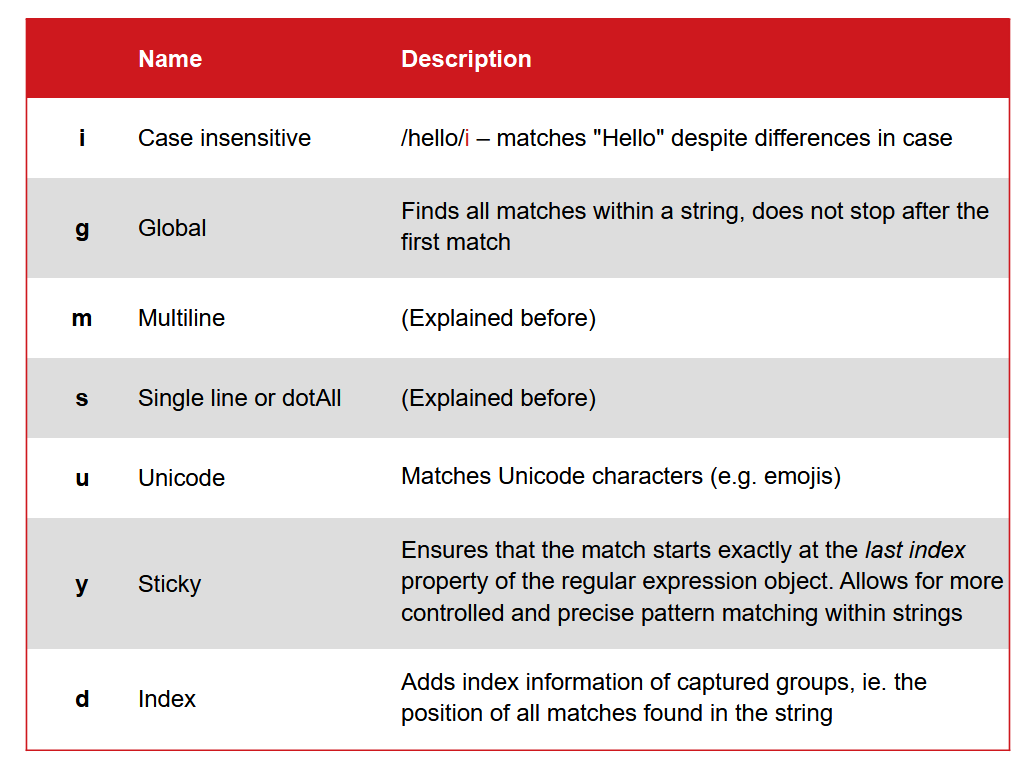
Example:

3.4 Character Classes
Some character classes have predefined shorthand notations for common ranges of characters. Combining these classes allows for more flexible and specific pattern matching, enabling a wide range of text-processing tasks.
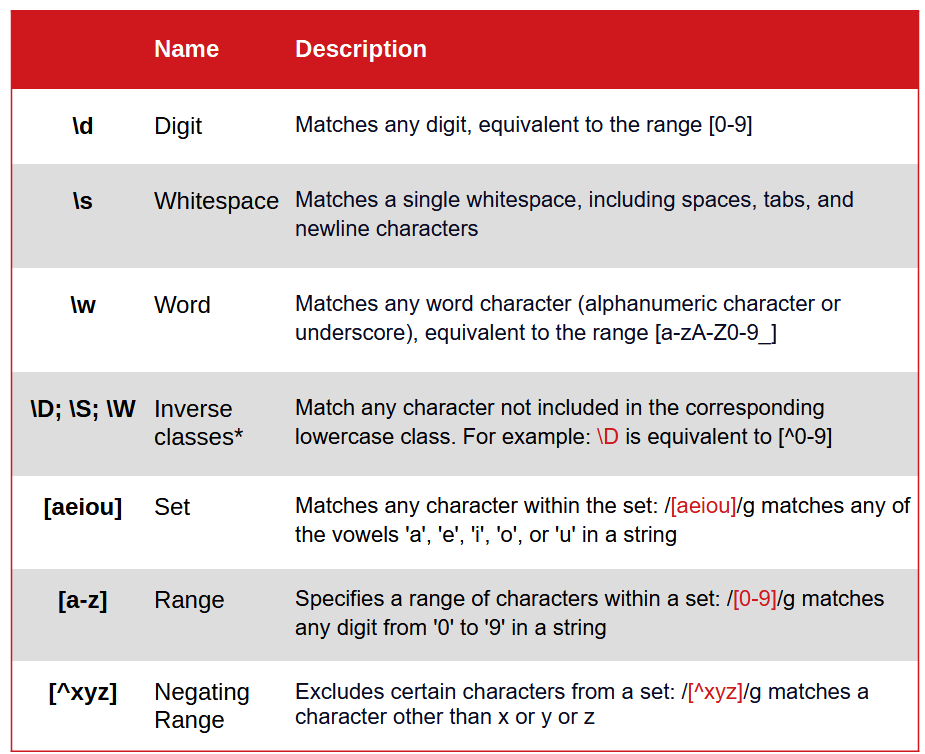
Examples: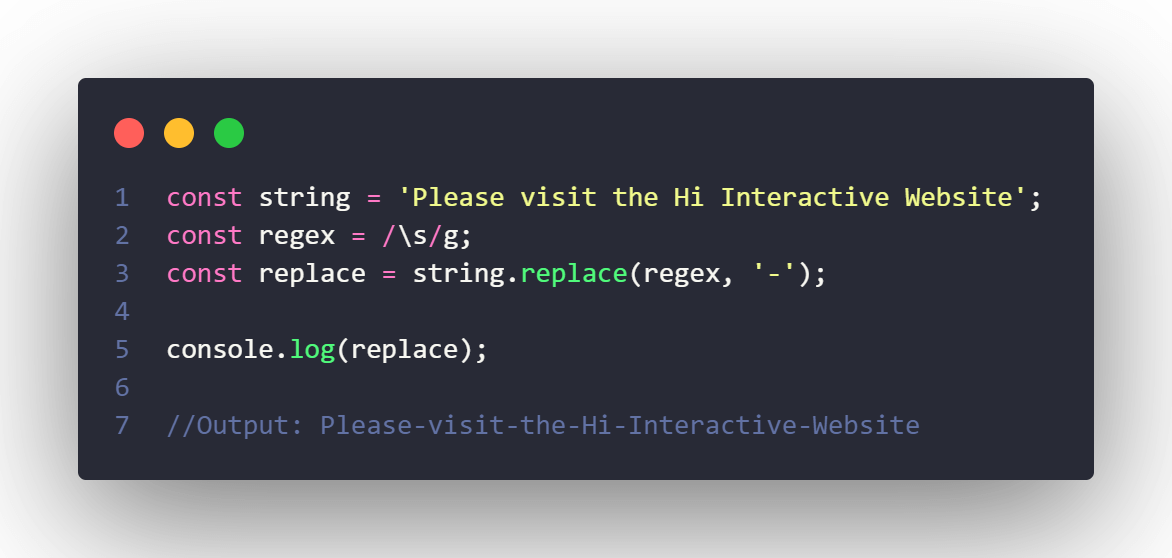

3.5 Groups
Grouping means treating a Regex pattern or a part of a Regex pattern as a single unit, by surrounding it in parentheses ().
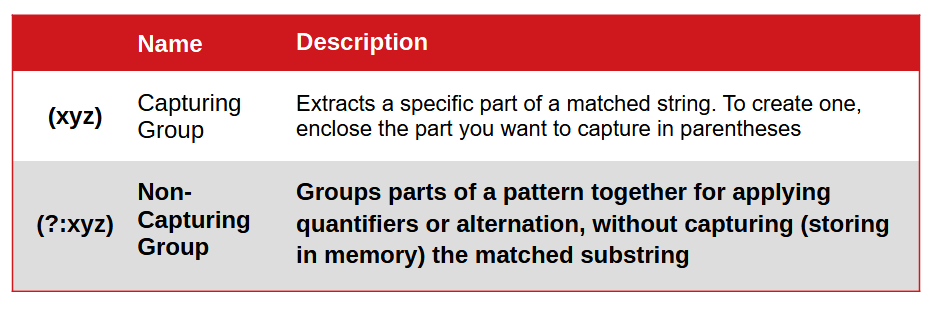
Example: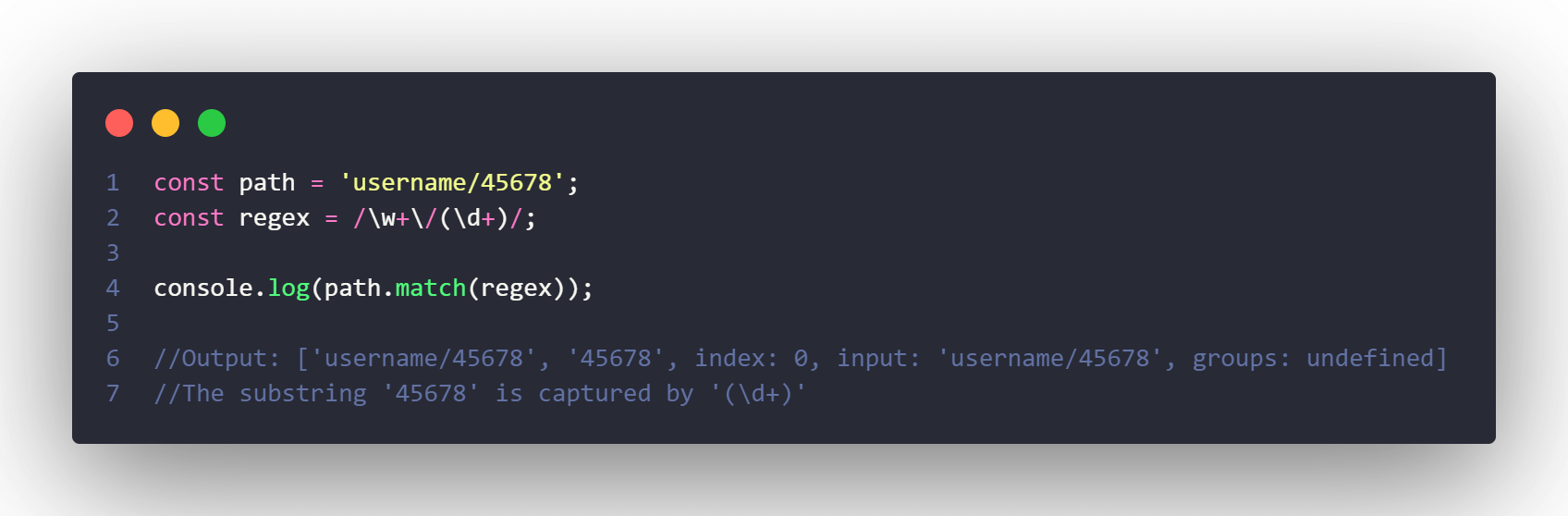
3.6 Backreferences
Backreferences enable you to reference and reuse the text captured previously by a group. They provide a powerful way to search for repeated patterns and validate complex text structures, functioning like variables that store matched patterns.
The syntax is a backslash followed by the group number, which is assigned based on the order of opening parentheses in the pattern, starting from 1.

As you can infer from the example above, capturing groups and backreferences are very useful for spotting duplicated words in a text:

3.7 Lookaround Assertions
Lookaround assertions are non-capturing groups that return matches only if the target string is followed (lookahead) or preceded (lookbehind) by a particular character. You can think of them as If statements in programming languages.
3.7.1 Lookahead
They can be positive or negative, and are really useful in password validation, for instance.
Positive:
Syntax: (?=chars)
Example: the pattern x(?=y)means – match x only if it is followed by y.
Negative:
Syntax: (?!chars)
Example, the pattern x(?!y) means – do not match x if it is followed by y.
3.7.2 Lookbehind
To recap, a lookbehind group is a non-capturing group that lets you match a part of a string only if it is preceded by another character in the string, without including that string or text to match in the pattern. As Lookaheads, they also can be positive or negative.
Positive:
Syntax: (?<=chars)
Example: in the pattern (?<=x)y – indicates you want to match y only if there’s x before it. In this case, xx or yx won’t match, but xy would match.
Negative:
Syntax: (?<!chars)
Example: in the pattern (?<!x)y – means do not match y if there’s x before it. In this case by would match, my, would match, but never xy.
Here’s another example using negative lookbehind and currency symbols:

4. Useful Tips and Best Practices
1. Keep It Simple: avoid using complex concepts like non-capturing groups if you don’t need them;
2. Don’t forget to Escape special characters: if you want to perform a literal match on metacharacters like . , * , + , { , } , and others, don’t forget to escape them unless you’re using them inside a character set. Sometimes, you even have to escape hyphens in a character set;
3. Avoid using the Wildcard (.) and try to be more specific;
4. Use word boundary to prevent unwanted matches;
5. Test Regular Expressions: they can sometimes behave unexpectedly, so write them on a Regex tester, using different scenarios;
6. Comment your code: add comments to your regex to explain complex patterns.
5. Resources
You can find a lot of information about Regex on the web, as expected. MDN Web Docs, W3Schools, freecodecamp, and the like, not to mention all the Youtube channels, podcasts and blogs, can help you along the way.
Instead, I leave you with some interactive tools to test and debug Regex, and tutorials.
Regex Testers:
Regex Visualizers:
Regex Learning:
Final note: in our MasterClass#37 video you can watch some interactions with these tools and some practical examples.
Thank you!